A vending machine touch screen is a UI module: display, touch panel and an Android or Linux board that talks to the vending machine controller (VMC) and payment devices. Choose size and orientation for the product range, PCAP or infrared touch for the site, enough serial ports for MDB or RS-232 payment, and 4G telemetry.
This guide is written by the engineering team of Beijing Huamei Xuntong Technology Co., Ltd. (TouchVision), a manufacturer founded in 2012 that designs and builds industrial displays, embedded boards, HMI panels, industrial gateways and edge AI computers.
Key takeaways
- Treat the vending machine touch screen as a UI computer on top of the VMC, which keeps control of dispensing and safety.
- Choose screen size, orientation and PCAP or infrared touch from the product range and the site, not from a catalogue default.
- MDB remains the standard bus for vending payment peripherals; version 4.3 (2019) changed only the cashless device section.
- Support local payment habits: contactless cards and phones widely, and QR instant payments such as Pix in Brazil, which need a reliable data link.
- Count serial ports, plan telemetry and remote updates, and check accessibility rules such as the European Accessibility Act early.
What does a vending machine touch screen actually do?
The touch screen turns a vending machine into a small shop: it shows products and prices, guides payment, runs promotions and reports sales, while the vending machine controller still drives motors, coolers and dispensing. Keeping these two roles separate is the most important design decision.
In most modern designs, the vending machine controller (VMC) remains the safety-critical master. It controls spirals, lifts, doors and temperature, and it talks to coin mechanisms, bill validators and cashless readers. The touch module sits on top as a user interface computer. It sends “customer chose item B4” to the VMC, receives “vend succeeded” or “vend failed”, and handles everything visual: product images, nutritional information, language selection, upsell offers and payment screens. If the UI computer reboots, the machine can still finish a vend safely.
That split also makes retrofits possible. A machine maker can add a large touch display to an existing platform without re-certifying the dispensing logic, as long as the UI board speaks the VMC’s serial protocol.
Which screen size, orientation and touch technology suit vending?
Snack and drink machines usually use a portrait display between 10 and 32 inches on the door, while coffee machines and micro markets favour smaller landscape screens; projected capacitive suits indoor sites and infrared suits outdoor or gloved use. The product range and the location decide.
| Machine type | Typical screen | Touch choice | Notes |
|---|---|---|---|
| Combined snack and drink, glass front replaced by screen | Large portrait, 21.5–32 inch class | PCAP indoors | Screen becomes the “shop window”; needs good brightness and anti-glare |
| Spiral machine with glass front plus side screen | Portrait 10–15 inch class | PCAP | Screen for selection, payment and promotions |
| Coffee and hot drinks | Landscape 7–15 inch class | PCAP | Recipe choice, cup size, strength; steam and splashes nearby |
| Outdoor machine, station or campus | Portrait 15–32 inch class | Infrared or tuned PCAP | Sunlight, rain, gloves, vandalism; thicker toughened glass |
| Micro market kiosk | Landscape or portrait 15–21.5 inch class | PCAP | Scanner and camera integration; easy cleaning |
For the trade-offs between the two touch technologies, see our infrared vs capacitive touch screen comparison. For brightness behind a shop window or outdoors, the sunlight readable display guide explains nits, bonding and glass treatments. If the screen is set into the door rather than mounted behind a bezel, compare open frame and panel mount monitors.
How does the touch screen talk to the VMC and the payment devices?
Payment devices in vending traditionally connect to the VMC over MDB, the Multi-Drop Bus, while the UI board talks to the VMC over a serial link such as RS-232 or RS-485 using the VMC maker’s protocol. Getting both links right avoids most integration delays.
MDB is the long-established interface standard for vending peripherals, maintained in the United States by NAMA. In MDB, the VMC is the bus master and polls the coin changer, bill validator and cashless reader. According to NAMA’s announcement of MDB version 4.3, released in August 2019 with contributions from the European Vending Association, the revision changed only Section 7, which covers cashless devices; the rest of the standard stayed the same as version 4.2.
There are three common ways to connect a UI module:
- UI as a peripheral of the VMC: the board talks to the VMC on a serial port; the VMC keeps control of MDB payment devices. This is the most common and safest arrangement.
- UI handles cashless itself: the Android board connects to a cashless reader or uses QR and app payments directly, then tells the VMC to vend. Useful when the payment provider’s SDK runs on Android.
- MDB adapter on the UI board: an interface lets the board appear to the VMC as a cashless device. This is useful for retrofits but must follow the MDB timing and session rules exactly.
Count serial ports early. A typical UI module may need one port for the VMC, one or two for payment devices, one for a scanner or camera, and one spare. Running out of UARTs late in a project usually forces USB-to-serial adapters, which are a common source of field faults.
Which cashless payment methods should the screen support?
Support what local buyers actually carry: contactless cards and phones in most markets, QR code payment schemes where they dominate, and cash only where it is still expected. The touch screen has to present each method clearly and recover from failures.
Brazil is a good example of how fast this changes. Brazilian payment provider Nayax Brasil, citing the central bank, says Pix already accounts for 54.7% of all payment transactions in the country. In its flow, the machine shows a QR code on the screen, the customer confirms the payment on a phone and the product is released in seconds; the provider also notes that the machine needs an internet connection to generate the QR code and confirm the transaction. That means a vending machine touch screen for Brazil needs a reliable 4G or Wi-Fi link, a clean QR display area and a timeout screen for payments that never arrive.
Plan payment screens as carefully as product screens: show the price, the accepted methods, progress while the payment is confirmed, and a clear message and refund path if the vend fails.
Does accessibility law apply to vending machine screens?
It can, depending on the market and what the machine does, so check early rather than redesigning later. In the European Union, the European Accessibility Act (Directive 2019/882) has applied since 28 June 2025 to products such as payment terminals and certain self-service terminals.
Whether a particular vending machine falls within the Act depends on its functions and on national transposition, so ask your compliance adviser. Even where it does not apply, the same design habits help every customer: large touch targets, high-contrast text, a reachable screen height, audio prompts, and payment devices placed where a wheelchair user can reach them. A board with an integrated audio codec makes voice guidance straightforward.
What about telemetry, refrigeration and long service life?
A vending machine touch screen works inside a cabinet that can be cold, humid and warm in turn, and it must report sales and faults remotely for years. Specify the environment and the update path, not only the display.
- Operating temperature: in refrigerated vending as elsewhere, check the board and display ratings against the warmest and coldest point in the door, not the room.
- Condensation: refrigerated machines can fog the screen when the door opens; consider bonding and venting.
- Telemetry: 4G or Wi-Fi for sales, stock and fault reports; a separate gateway can retrofit older machines.
- Remote updates: secure over-the-air updates for content, prices and the OS image.
- Watchdog and recovery: automatic restart of the UI application and a fallback image.
- Serial ports counted: VMC, payment, scanner and spare.
- Audio: speaker and microphone path for prompts and accessibility.
- Supply life: a frozen bill of materials and change notifications for the expected production run.
Which TouchVision parts are used in vending UI modules?
TouchVision supplies vending displays from 7 to 32 inches with PCAP or infrared touch, Android and Linux control boards, and telemetry gateways, and can deliver the touch screen and board as one tested UI module. MDB adaptation is available on request.
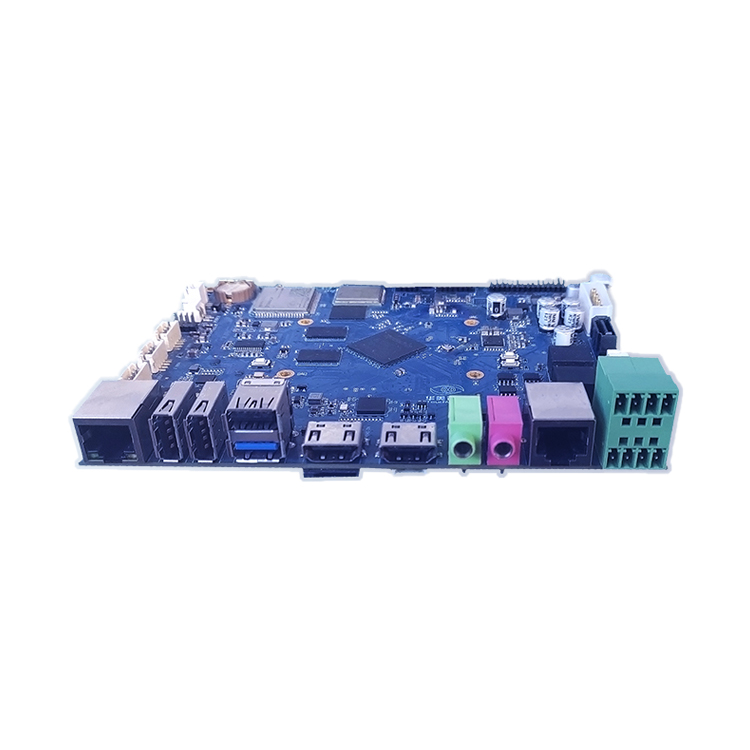
For media-rich interfaces, the TV-RK3568 industrial motherboard links to the VMC and payment devices over RS-485 and RS-232, drives dual LVDS, HDMI or eDP displays and supports Android 10, Ubuntu and Debian, with gigabit Ethernet, Wi-Fi and Bluetooth 5.0. Compact machines that need voice prompts can use the TV-RK3308 control board, which combines four Cortex-A35 cores at 1.3 GHz with an integrated audio codec (8 ADC / 2 DAC), RGB/MCU display output up to 720p, two RS-485 ports, Wi-Fi and 4G, and a −20 to +80 °C rating. To add remote reporting to machines already in the field, the TV-IS013 gateway offers RS-485, CAN, gigabit Ethernet, 4G and Wi-Fi with MQTT, Modbus, OPC UA and HTTP connections.
Displays include the PCAP touch monitor with an IP65 front and the infrared touch screen series for outdoor machines. Read more on choosing an embedded board and display interfaces, or see the vending machines and smart retail page.
About TouchVision. TouchVision has designed and manufactured industrial touch displays, embedded boards, panel PCs, IoT gateways and edge AI computers since 2012, from standard models to full OEM/ODM projects. Standard products carry a 3-year warranty from delivery. For bespoke builds, see our custom vending touch screen and board modules on the TouchVision OEM/ODM site, or read about us.
Frequently asked questions
What size touch screen is used in vending machines?
Large portrait screens in the 21.5–32 inch class are common when the screen replaces the glass front; 10–15 inch screens suit side panels and 7–15 inch landscape screens suit coffee machines. TouchVision supplies 7 to 32 inch displays.
Should a vending machine use Android or Linux?
Android suits media-rich interfaces and payment SDKs built for Android; Linux suits leaner, long-life designs with a fixed UI. Boards such as the TV-RK3568 support both.
What is MDB in a vending machine?
MDB, the Multi-Drop Bus, is the standard serial interface between the vending machine controller and payment peripherals such as coin changers, bill validators and cashless readers. NAMA released version 4.3 in 2019.
Can a touch screen be added to an existing vending machine?
Yes, if the UI board can talk to the existing VMC over its serial protocol, or act as a cashless device through an MDB adapter. A telemetry gateway can add remote reporting at the same time.
Does Pix work on vending machines in Brazil?
Yes. The machine shows a QR code on its screen, the customer pays by phone, and the product is released once payment is confirmed. The machine needs an internet connection for this.
Sources and standards referenced
- NAMA: NAMA releases MDB version 4.3
- Nayax Brasil: Pix and contactless payment in vending machines (Portuguese)
- EUR-Lex: Directive (EU) 2019/882, the European Accessibility Act
Need a recommendation for your project?
Send your drawings, quantities and environment through our RFQ form and a TouchVision engineer will reply with a recommended configuration, quotation and sample plan. You can also call or WhatsApp +86 135 0532 6001.