LVDS vs eDP vs MIPI DSI: which should you choose? Use LVDS for industrial panels up to Full HD and longer internal cables, eDP for high-resolution panels with short cables and fewer wires, and MIPI DSI for small, low-power screens close to the processor. Start from what your SoC outputs natively and what the panel accepts.
This guide is written by the engineering team of Beijing Huamei Xuntong Technology Co., Ltd. (TouchVision), a manufacturer founded in 2012 that designs and builds industrial displays, embedded boards, HMI panels, industrial gateways and edge AI computers.
Key takeaways
- In LVDS vs eDP terms, LVDS is the robust default for industrial panels up to Full HD, with dual-channel LVDS for larger resolutions.
- eDP carries high-resolution and 4K panels over fewer wires but needs short, controlled-impedance cables and link training.
- MIPI DSI suits small, low-power panels close to the processor; check panel lifecycle and initialisation code.
- Match the SoC’s native output to the panel; use a bridge chip only when no native match exists.
- Check JEIDA or VESA mapping, cable routing, power sequencing and backlight drive before freezing the design.
What do LVDS, eDP and MIPI DSI actually do?
All three are digital display interfaces that carry pixel data from a processor or controller board to an LCD panel, but they use different signalling, wiring and protocols. The choice affects panel availability, cable length, EMI, power and whether you need an extra bridge chip.
- LVDS (FPD-Link / OpenLDI): serialises RGB pixel data over several low-voltage differential pairs plus a clock pair. It has been the standard TFT LCD interface for industrial and medical panels for many years.
- eDP (embedded DisplayPort): a VESA standard derived from DisplayPort. It sends packetised data over one to four high-speed lanes with an embedded clock and a separate AUX channel for configuration.
- MIPI DSI: the MIPI Alliance display serial interface, usually carried over a D-PHY physical layer with one to four data lanes. It dominates phones and tablets.
A fourth option, the RGB parallel interface (also called DPI), sends each colour bit on its own wire. It is simple and cheap for small, low-resolution panels but needs many pins and short connections.
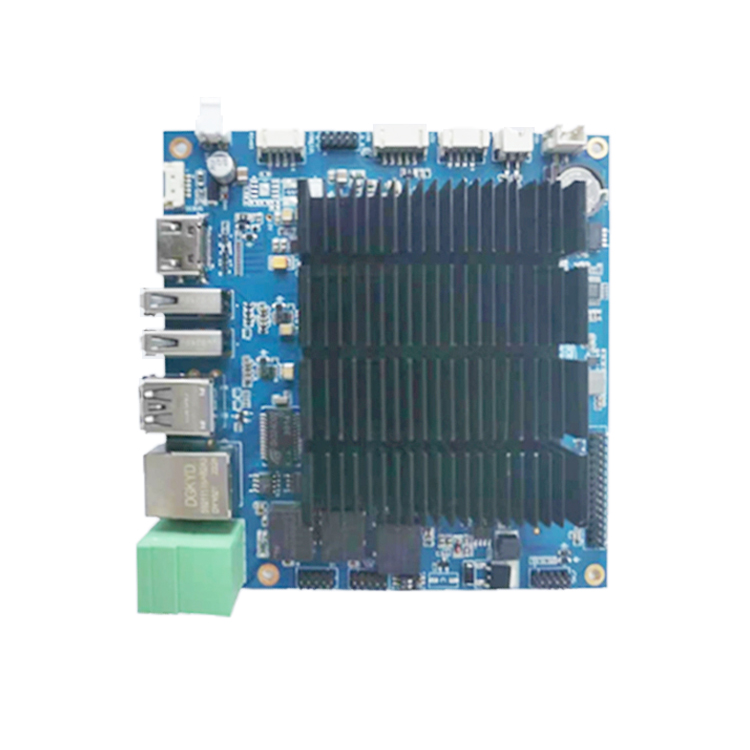
LVDS vs eDP vs MIPI DSI: how do they compare?
LVDS is the robust all-rounder, eDP is the high-resolution specialist and MIPI DSI is the low-power, short-distance option. TI’s display interface guide for Sitara processors draws a similar picture.
| Factor | LVDS | eDP | MIPI DSI |
|---|---|---|---|
| Typical panel sizes in industry | About 7″ to 24″ and larger | Mostly larger, high-resolution panels | Mostly small panels, up to about 10″ |
| Resolution range | Single channel to about 1366×768 class; dual-channel LVDS for Full HD | Full HD to 4K and above | Phone and tablet resolutions; depends on lane count |
| Wiring | 4–5 pairs per channel, plus clock | 1–4 lanes plus AUX and hot-plug detect | 1–4 data lanes plus clock lane |
| Internal cable length | Longest of the three; robust in noisy cabinets | Short internal cables | Shortest; FPC close to the board |
| Configuration | None; panel timing fixed in the board software | Link training over AUX; EDID readout | Panel initialisation commands from the host |
| Power features | Basic | Panel self refresh and other power savings | Command mode and low-power states |
| Industrial panel availability | Very wide, long-lifecycle | Growing, common in larger sizes | Limited, often consumer-lifecycle panels |
Why is LVDS still the default for industrial panels?
In most LVDS vs eDP decisions for industrial panels, LVDS remains the default because it tolerates electrical noise and longer internal cables, needs no link negotiation and is offered on a huge range of long-lifecycle industrial panels. For a 10″ to 21″ HMI or kiosk display, it is often the lowest-risk choice.
Differential signalling rejects common-mode noise from motors, relays and switching power supplies, which matters inside machine cabinets and chargers. Because there is no handshake, a correctly timed LVDS link simply shows an image at power-up, which simplifies boot screens and fault diagnosis. When the display must sit far from the controller, the same family of technology can be extended: TI describes FPD-Link serializer and deserializer chipsets that reach up to 10 metres with cable drivers and equalisers.
Two practical LVDS details catch many projects. First, 24-bit panels use either the JEIDA or the VESA bit mapping; a mismatch gives wrong or washed-out colours rather than no picture, so check the panel datasheet against the board setting. Second, Full HD and larger panels usually need dual-channel LVDS, with odd and even pixels on separate channels, so the board must support dual-channel output.
LVDS vs eDP: when is eDP the better choice?
eDP is the better choice when the panel resolution exceeds what LVDS carries comfortably, or when fewer wires and power-saving features matter. High-resolution 15.6″ to 27″ panels and 4K displays increasingly offer eDP only.
Each eDP lane runs at gigabit rates defined by the DisplayPort family (for example 1.62, 2.7, 5.4 or 8.1 Gbit/s per lane, depending on the version and panel), so four lanes carry far more data than a dual LVDS link with fewer conductors. The trade-off is sensitivity: high-speed lanes need controlled-impedance cables and connectors, short runs and care with grounding, and the link only comes up after successful link training over the AUX channel. When a screen stays black on an eDP design, the cause is often the cable, the lane configuration or the panel’s power sequencing, not the graphics driver.
Where does MIPI DSI fit in industrial products?
MIPI DSI fits compact, battery-powered or handheld products where the panel sits right next to the processor and power consumption matters. It needs few pins and supports low-power modes, but it is designed for board-level distances, not cables across a cabinet.
Two cautions apply to industrial buyers. Many DSI panels come from the consumer phone and tablet supply chain, where models change quickly, so a long-life product may need a lifecycle commitment from the panel maker. DSI panels also need a vendor-specific initialisation sequence sent from the host, which adds software work for each new panel. The physical layer is the MIPI D-PHY, whose high-speed lanes are intended for short traces and flexible printed circuits. Note that MIPI CSI on a board is a camera input, not a display output, a common mix-up when reading board specifications.
What if the SoC and the panel use different interfaces?
A bridge chip can convert between interfaces, for example MIPI DSI to LVDS or eDP to LVDS, but it adds cost, power, board space and another driver to maintain. Use one when the right panel is only available with a different interface; avoid it when a native match exists.
Common bridges convert a processor’s DSI or RGB output to single or dual LVDS, or convert eDP to LVDS for legacy panels. Before choosing one, confirm Linux driver support, the maximum pixel clock and whether the bridge needs its own configuration at boot. Wherever possible, pick a board whose native outputs already match the panel: that is the simplest way to cut EMI risk and bring-up time.
Display interface selection checklist
Check these points before freezing the display and board combination.
- Panel size, resolution, colour depth and refresh rate.
- Native outputs of the SoC or controller board; any bridge chip needed.
- LVDS vs eDP decision: single or dual-channel LVDS with JEIDA or VESA mapping, or eDP lane count and rate.
- Internal cable route and LVDS cable length; shielding and grounding near motors or chargers.
- Backlight driver location and dimming method (PWM or analogue).
- Power-up sequencing for panel logic, backlight and signals.
- Panel lifecycle and second-source options.
- Touch interface (USB or I²C) and how it routes alongside the display cable.
Which interfaces do TouchVision boards and monitors support?
TouchVision boards cover LVDS on every mainstream platform, with eDP and HDMI on the RK3568 and RGB on lower-cost boards, so most industrial panels can be driven natively. Monitor interfaces are configured per project.
| TouchVision product | Display outputs (per product page) |
|---|---|
| TV-RK3568 | Dual-channel LVDS, 2× HDMI 4K, eDP; independent dual display |
| TV-i.MX8M | Dual-channel LVDS, HDMI 4K |
| TV-AM3354 | Single or dual-channel LVDS, RGB |
| TV-AM3354 2-in-1 | Single or dual-channel LVDS, RGB, onboard LED backlight driver |
| TV-RK3308 | RGB/MCU up to 720p |
| PCAP touch monitor | HDMI, LVDS or eDP options per platform |
See the full embedded board range, our embedded board comparison and the industrial touch monitor range.
About TouchVision. TouchVision has designed and manufactured industrial touch displays, embedded boards, panel PCs, IoT gateways and edge AI computers since 2012, from standard models to full OEM/ODM projects. Standard products carry a 3-year warranty from delivery. For bespoke builds, see our custom display and controller board integration on the TouchVision OEM/ODM site, or read about us.
Frequently asked questions
What is the main difference in LVDS vs eDP?
LVDS sends pixel data over several differential pairs with a separate clock and no negotiation. eDP sends packetised data over high-speed lanes with an embedded clock and uses link training over an AUX channel. eDP supports higher resolutions with fewer wires; LVDS tolerates longer cables and noise.
Can I connect an eDP panel to an LVDS board?
Not directly. You need a bridge chip that converts LVDS to eDP, or a board with a native eDP output. Choosing a matching board is usually simpler and more reliable.
How long can an LVDS cable be?
Inside equipment, LVDS tolerates longer cables than eDP or MIPI DSI, but the safe length depends on the pixel clock, cable quality and panel. For distances of several metres, use serializer/deserializer links designed for long reach.
Is MIPI DSI suitable for industrial displays?
Yes for small, compact designs, but panel choice and lifecycle are more limited than with LVDS, and each panel needs its own initialisation sequence.
Why are the colours wrong on my LVDS display?
The most common cause is a JEIDA versus VESA bit-mapping mismatch, or 6-bit versus 8-bit colour depth settings. Check the panel datasheet against the board’s display configuration.
Sources and standards referenced
- TI SPRADF7A: Display Interfaces, a guide to Sitara MPU visualization designs
- TI SNLA103A: Extending the reach of an FPD-Link II interface
- MIPI Alliance: Display Serial Interface (DSI)
- MIPI Alliance: D-PHY
- VESA standards
- Wikipedia: Low-voltage differential signaling
Need a recommendation for your project?
Send your drawings, quantities and environment through our RFQ form and a TouchVision engineer will reply with a recommended configuration, quotation and sample plan. You can also call or WhatsApp +86 135 0532 6001.