Edge AI video analytics runs detection models on a box next to the cameras and sends only events and metadata onward. Cloud video analytics streams video to remote servers. Edge saves upload bandwidth, keeps footage on site, reacts in milliseconds and works offline; cloud is easier to scale and update for a few cameras.
This guide is written by the engineering team of Beijing Huamei Xuntong Technology Co., Ltd. (TouchVision), a manufacturer founded in 2012 that designs and builds industrial displays, embedded boards, HMI panels, industrial gateways and edge AI computers.
Key takeaways
- Edge AI video analytics runs models next to the cameras and uploads only events and metadata; cloud analytics uploads the video itself.
- At an assumed 4 Mbit/s per camera, 16 cameras need about 64 Mbit/s of continuous upload, roughly 691 GB per day, for cloud analysis.
- Local processing supports GDPR data minimisation, but CCTV duties such as purpose, signage, retention and impact assessments still apply.
- Edge boxes alarm within the local network and keep working offline; cloud systems stop analysing when the link drops.
- A hybrid design, with detection at the edge and fleet management in the cloud, often gives the best balance.
What is the difference between edge and cloud video analytics?
The difference is where the neural network runs: on hardware at the site in an edge design, or on remote servers in a cloud design. Everything else, from bandwidth bills to privacy duties, follows from that placement.
In an edge design, IP cameras send their RTSP streams over the local network to a compact computer with an AI accelerator. The box decodes the video, runs detection models such as intrusion, fire and smoke or PPE checks, and forwards only what matters: an alarm, a snapshot, a short clip or structured metadata such as “person in restricted zone, camera 7, 14:02:11”. The full video can stay on a local recorder.
In cloud video analytics, the camera or a small gateway uploads continuous or motion-triggered video to a data centre, where scalable servers run the models. The operator sees results in a web dashboard and pays per camera, per hour of video or per inference. Many real systems are hybrid: detection at the edge, with dashboards, reporting and model management in the cloud.
How much upload bandwidth does each approach need?
Cloud analytics needs sustained upload roughly equal to the sum of all camera bitrates, while edge analytics only uploads events and metadata, which is usually a small fraction of that. Upload capacity is often the hidden cost that decides the architecture.
A simple planning example makes the point. Assume each camera stream averages 4 Mbit/s. This is an assumption for illustration; real bitrates depend on resolution, codec, frame rate and scene activity, so measure your own cameras.
| Cameras (at an assumed 4 Mbit/s each) | Continuous upload for cloud analysis | Data uploaded per day | Edge design: what leaves the site |
|---|---|---|---|
| 4 | 16 Mbit/s | about 173 GB | Alarms, snapshots and metadata only |
| 16 | 64 Mbit/s | about 691 GB | Alarms, snapshots and metadata only |
| 32 | 128 Mbit/s | about 1.38 TB | Alarms, snapshots and metadata only |
The daily figure is simply bitrate × 86,400 seconds ÷ 8. On fibre at a head office, 64 Mbit/s of upload may be acceptable. On a 4G link at a construction site, a fuel station or a remote substation it usually is not, and mobile data at that volume is expensive. Motion-triggered upload reduces the load but also means the cloud model only sees what the camera’s simple motion detector chose to send, which can miss slow or subtle events.
Which approach is easier to align with GDPR and privacy rules?
Edge processing makes data minimisation easier because raw footage does not have to leave the site, but it does not remove the obligations of a CCTV operator. Privacy regulators in Europe, the UK, Singapore and Japan all expect a clear purpose, limited retention and transparency, wherever the analysis runs.
- European Union: the European Data Protection Board’s guidance, EDPB Guidelines 3/2019 on processing personal data through video devices (final version adopted January 2020) explain how GDPR applies to video surveillance, including lawful basis, transparency signs and storage periods. Under GDPR, data must be adequate, relevant and limited to what is necessary, which favours analysing video locally and keeping only results.
- United Kingdom: the Information Commissioner’s Office publishes guidance on video surveillance, including CCTV, which covers newer technologies such as automated recognition and expects a data protection impact assessment for higher-risk processing.
- Singapore: the Personal Data Protection Commission’s advisory guidelines on selected topics cover photographs, video and CCTV recordings, including how individuals should be notified.
- Japan: the Ministry of Economy, Trade and Industry and the Ministry of Internal Affairs and Communications released the Camera Image Utilisation Guidebook version 3.0 on 30 March 2022, with practical points for businesses that use camera images for purposes such as analytics.
Cloud deployment adds questions an edge design can avoid: which country stores the footage, which subprocessors can access it, and how international transfers are justified. If the system recognises people biometrically, the EU Artificial Intelligence Act (Regulation 2024/1689) also needs checking, whatever the hardware location. Object and event detection, such as fire, smoke, fallen persons or vehicles in fire lanes, is generally a lighter compliance case than identifying individuals.
How do latency and offline operation compare?
Edge AI video analytics responds within the local network and keeps working when the internet link drops, which matters for safety alarms and access control. A cloud system adds the round trip to the data centre and stops analysing when the link fails.
For a dashboard that counts visitors per hour, a delay of a few seconds is irrelevant. For a forklift entering a pedestrian zone, smoke in a cable room or a person climbing a fence, it is not. An edge box can drive a local siren, a relay or a PLC over RS-485 directly, and it can buffer events until the uplink returns. The same logic applies to sites with poor coverage: mines, ports, farms and rural utility assets often cannot guarantee upload at all.
When does cloud video analytics still make sense?
Cloud analytics makes sense for a small number of cameras on good connections, for heavy models that only run occasionally, and for teams that want no on-site hardware to manage. It also simplifies model updates across many sites.
Cloud services can apply very large models, retrain them on pooled data and roll out new features centrally. Where cameras are few, bandwidth is cheap and footage is not sensitive, these benefits can outweigh the upload cost. A hybrid architecture often gives the best balance: edge boxes detect and filter, and the cloud stores events, runs reports, manages fleets and pushes updated models to the boxes.
| Factor | Edge AI video analytics | Cloud video analytics |
|---|---|---|
| Upload bandwidth | Events, snapshots and metadata | Continuous or triggered video |
| Footage location | Stays on site | Stored by the provider |
| Alarm latency | Local network | Internet round trip |
| Internet outage | Keeps analysing and buffers events | Analysis stops |
| Cost model | One-off hardware plus support | Recurring per camera or per hour |
| Model updates | Pushed to each box | Central |
| Best fit | Many cameras, weak links, sensitive sites, safety alarms | Few cameras, strong links, occasional heavy analysis |
How do you size an edge AI box for your cameras?
Size the box by the number of streams it must analyse at once, not just by its INT8 TOPS figure, and check decoding capacity, interfaces and power. Our separate guide on how many cameras an edge AI box can handle walks through the calculation.
- Stream count: cameras to analyse concurrently, plus any extra decode-only streams.
- Algorithms per stream: each extra model per camera uses more of the accelerator.
- Uplink: what must be sent (alarms, clips, metadata) and over which link (Ethernet, 4G).
- Retention: how long footage and events are kept, and where.
- Integration: RS-485, alarm inputs, relays or an API to the VMS or building system.
- Power and environment: DC or AC supply, cabinet temperature, mounting.
- Privacy file: purpose, lawful basis, signage, impact assessment where required.
Which TouchVision boxes run edge AI video analytics?
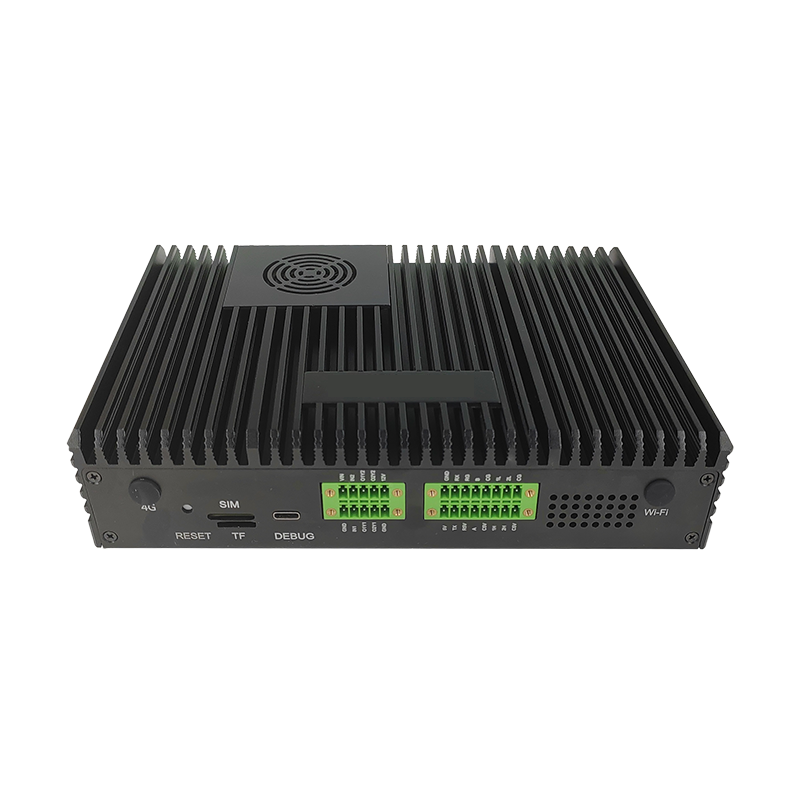
TouchVision’s edge AI boxes are built on the BM1684 platform with 17.6 TOPS INT8 and analyse 16 HD streams on the box, so video stays on the local network and only events or alarms are forwarded. They come with a library of more than 50 ready algorithms.
The YZ-B011 16-channel AI video analytics box decodes 32 channels of 1080p30 video, has three gigabit Ethernet ports, digital I/O, RS-232/485 and two isolated CAN ports, runs from 12–36 V DC and operates from −20 to +70 °C. The YZ-B013 AI edge computing box fits the same 16-stream capacity into 217 × 155 × 48 mm with typical power of 20 W or less from a 12 V/5 A supply. Where only mains power is available, the YZ-B016 takes 220 V AC directly and adds two alarm inputs and two RS-485 ports.
The algorithm library covers scenarios such as fire and smoke, intrusion, PPE, parking, blocked fire lanes and e-bikes in elevators, and the platform supports models from TensorFlow, PyTorch, ONNX, Caffe, MXNet and PaddlePaddle. See what an edge AI box is for the basics, our AI video analytics solutions page for scenarios, and on-premise LLM vs cloud AI for the same edge-versus-cloud question applied to language models.
About TouchVision. TouchVision has designed and manufactured industrial touch displays, embedded boards, panel PCs, IoT gateways and edge AI computers since 2012, from standard models to full OEM/ODM projects. Standard products carry a 3-year warranty from delivery. For bespoke builds, see our custom edge AI hardware and algorithms on the TouchVision OEM/ODM site, or read about us.
Frequently asked questions
Is edge AI video analytics cheaper than cloud?
For many cameras or weak uplinks it usually is, because there is no continuous video upload and no per-camera subscription for analysis. For a handful of cameras on fast fibre, a cloud service can cost less to start.
Does edge processing make video analytics GDPR compliant?
Not by itself. Keeping footage on site supports data minimisation and avoids international transfers, but you still need a lawful basis, signage, retention limits and, for higher-risk uses, a data protection impact assessment.
How much bandwidth does cloud video analytics need?
Roughly the sum of the camera bitrates. At an assumed 4 Mbit/s per camera, 16 cameras need about 64 Mbit/s of sustained upload. Measure your real bitrates before planning.
Can an edge AI box work without internet?
Yes. Analysis runs locally, so alarms can drive local sirens, relays or RS-485 devices, and events can be buffered and sent when the connection returns.
How many cameras can one TouchVision edge AI box analyse?
The YZ-B011 and YZ-B013 analyse 16 HD streams concurrently on a BM1684 platform with 17.6 TOPS INT8, and the YZ-B011 can decode 32 channels of 1080p30 video.
Sources and standards referenced
- EDPB: Guidelines 3/2019 on processing of personal data through video devices
- ICO: guidance on video surveillance (including CCTV)
- PDPC Singapore: advisory guidelines on the PDPA for selected topics
- MIC and METI Japan: Camera Image Utilisation Guidebook ver. 3.0 (Japanese)
- EUR-Lex: Regulation (EU) 2024/1689, the Artificial Intelligence Act
Need a recommendation for your project?
Send your drawings, quantities and environment through our RFQ form and a TouchVision engineer will reply with a recommended configuration, quotation and sample plan. You can also call or WhatsApp +86 135 0532 6001.