A solar parking pay station runs from a small solar panel and battery, so every part must earn its place in the power budget. Specify a touch display that stays readable in sun at low backlight power, a fanless controller with deep sleep, a 4G modem rather than 2G or 3G, vandal-resistant glass and controls within reach of wheelchair users.
This guide is written by the engineering team of Beijing Huamei Xuntong Technology Co., Ltd. (TouchVision), a manufacturer founded in 2012 that designs and builds industrial displays, embedded boards, HMI panels, industrial gateways and edge AI computers.
Key takeaways
- A solar parking pay station lives or dies by its power budget, measured against the darkest weeks at the site.
- The display backlight is usually the largest load, so use an efficient bright panel or a transflective LCD with a light sensor.
- A low-power fanless controller with sleep, watchdog and RTC keeps the machine alive between transactions.
- Design with 4G at minimum: UK 3G is off and 2G ends by 2033, and Japan’s docomo closed 3G in March 2026.
- Keep controls within reach ranges and show the tariff clearly to meet accessibility and parking-code expectations.
What hardware is inside a solar parking pay station?
A solar parking pay station combines a payment terminal, a display and controller, a printer or virtual-ticket link, a cellular modem and a solar charging system in one weatherproof cabinet that may never see mains power. European makers show the pattern clearly. A German municipal supplier sells a solar pay and display machine as a standing column with external solar supply, a 10-inch touch display, an LTE modem, a card payment module and an integrated printer. Another German maker offers a stainless-steel machine whose 7-inch colour touch version can run entirely from its built-in solar panel. A Spanish smart-parking company lists a 32 W rotatable solar panel, a 10.4 or 12-inch 1280×800 colour touch screen rated IK10, and real-time connection over 3G, 4G, 5G or Wi-Fi.
The same building blocks repeat: payment, user interface, communication and energy. The difference between a reliable machine and one that goes dark every winter is how well these parts are matched to the panel and battery.
How do you build a power budget for a solar pay station?
Start from the energy each component uses per day, in standby and in use, and compare it with what the panel can harvest on the darkest weeks of the year at the installation site, leaving several days of battery autonomy for overcast weather.
| Load | Behaviour | Design lever |
|---|---|---|
| Display backlight | Often the largest load while awake | Bright-but-efficient panel, ambient light sensor, fast timeout |
| Controller board | Small but continuous if never asleep | Low-power ARM SoC, suspend mode, wake on touch or button |
| Cellular modem | Peaks during transmission | Batch uploads, power-save modes, good antenna placement |
| Cashless payment terminal | Active per transaction, standby in between | Choose a reader with a low standby draw |
| Ticket printer and heater | Short peaks; heaters can dominate in cold sites | Virtual tickets, heating only where needed |
A German product sheet gives a sense of scale: its solar version pairs the panel with a 12 V, 45 Ah battery, while the mains version needs only a 12 V, 7 Ah buffer battery. The same machine is specified for -20 to +55 °C operation and up to 100% relative humidity with condensation allowed, which shows why electronics for these cabinets need wide temperature ratings and conformal protection.
Which display works on a solar parking meter?
The display must stay readable in direct sun without a power-hungry backlight, so the usual choices are a high-brightness panel with optical bonding and an ambient light sensor, or a transflective LCD that reflects sunlight to light the image. A bright transmissive panel looks better in the shade and at night, but draws more power. A transflective panel becomes more readable as the sun gets stronger and draws little in daylight, at the cost of colour and contrast indoors. Anti-reflective cover glass and optical bonding help both by cutting reflections that wash out the image. Our sunlight readable display guide explains nits, contrast and bonding in more detail, and OCA vs LOCA vs air gap covers the bonding choice.
For the touch layer, an IK10-rated glass front is now common on street machines. Projected capacitive touch behind thick glass suits most sites; infrared frames tolerate gloves well but need a raised bezel. See our infrared vs capacitive guide.
Why must new pay stations use 4G after the 2G and 3G switch-off?
Mobile operators are retiring 2G and 3G networks, so a pay station designed today should use a 4G modem at minimum, with a plan for networks that will eventually retire older LTE categories too.
- United Kingdom: Ofcom reports that 3G has now been switched off and that 2G will be gone by 2033 at the latest, with EE, O2 and Vodafone starting 2G switch-off between 2029 and 2030. Ofcom says 2G-only devices will need upgrading to at least 4G, and lists payment terminals and alarms among the devices that may still rely on 2G. Mobile UK, the operators’ trade body, confirms that no operator plans to offer 2G or 3G beyond 2033.
- Japan: NTT docomo ended its 3G FOMA service on 31 March 2026.
If you operate an older fleet, plan the modem swap now: check whether your controller board can take a 4G module, and whether the power budget still balances with the new modem.
What accessibility and signage rules apply to pay stations?
Pay stations must be usable by people in wheelchairs and by people who need more time, so place controls within standard reach ranges and design the interface to avoid rushing users. In the United States, the ADA reach range for operable parts is between 15 and 48 inches (380 to 1220 mm) above the floor for an unobstructed forward or side reach. In the United Kingdom, the Private Parking Code of Practice requires payment instructions and contact details to be shown on or next to payment machines, including what happens if a machine is out of order, and asks operators to recognise that disabled drivers may need more time to reach and use payment machinery, and other ways to pay. A clear on-screen tariff, large touch targets and a timeout that is not too aggressive help with all of these.
Solar parking pay station specification checklist
- Site energy: worst-month solar harvest, panel size and tilt, battery capacity and days of autonomy.
- Power budget: daily energy for display, controller, modem, payment reader, printer and heating.
- Display: size, brightness or transflective type, optical bonding, ambient light sensor.
- Touch and glass: PCAP or infrared, glass thickness and IK rating.
- Controller: low-power ARM board, sleep and wake sources, watchdog and RTC, serial ports for payment and printer.
- Connectivity: 4G LTE modem, antenna position, fallback for weak coverage.
- Environment: operating temperature, humidity and condensation, sealing of the cabinet.
- Accessibility: control heights within reach range, readable tariff, sensible timeouts.
- Back office: remote monitoring of battery, alarms, tariffs and software updates.
What does TouchVision supply for parking pay stations?
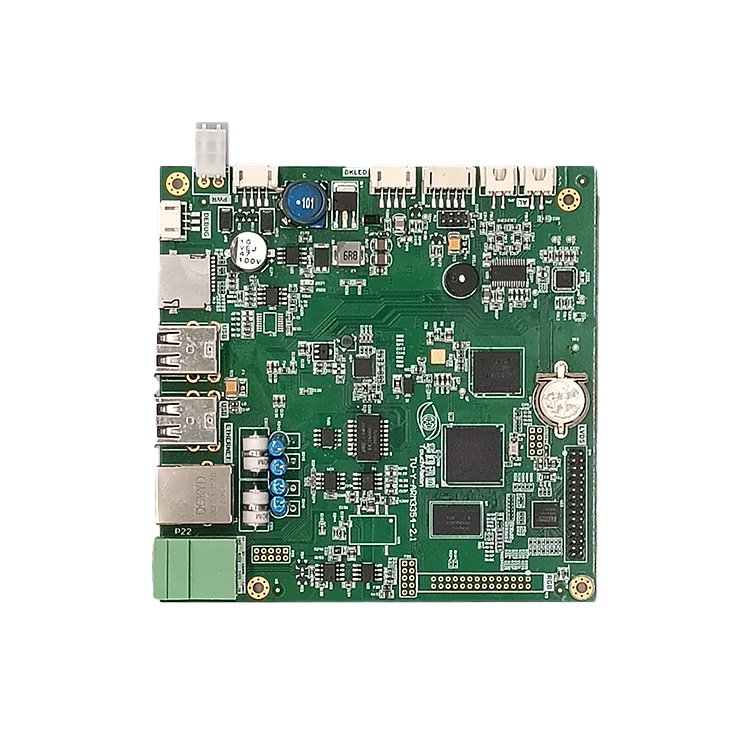
TouchVision supplies sunlight-readable touch displays and low-power controller boards for parking pay stations and ticket machines, and confirms exact power budgets and sleep behaviour per project rather than quoting generic figures. The fanless TV-AM3354 board has a watchdog, RTC and five RS-485 ports for payment and printer modules and is rated for -20 to +85 °C; it takes a 24 V DC input, so 12 V solar systems need a suitable DC-DC stage. The TV-RK3308 control board has 4G and Wi-Fi onboard for cost-sensitive machines, and the TV-RK3568 motherboard suits larger graphical terminals. For the screen, see the sunlight readable and open frame touch monitors, with transflective or high-brightness LCDs available on request. More configurations are on the parking and ticketing terminals page, and front sealing is covered in our waterproof touch screen guide.
About TouchVision. TouchVision has designed and manufactured industrial touch displays, embedded boards, panel PCs, IoT gateways and edge AI computers since 2012, from standard models to full OEM/ODM projects. Standard products carry a 3-year warranty from delivery. For bespoke builds, see our custom industrial motherboard service on the TouchVision OEM/ODM site, or read about us.
Frequently asked questions
How big a solar panel does a parking pay station need?
It depends on the site’s worst-month sunlight and the machine’s daily energy use. Commercial examples range from small built-in panels to a 32 W rotatable panel; size the panel and battery from a measured power budget.
Which display is best for a solar parking meter?
A transflective LCD or an efficient high-brightness panel with optical bonding and an ambient light sensor. Both keep the screen readable in sun without wasting battery energy.
Do parking meters still work on 3G?
Not in markets where 3G is closed. The UK has switched 3G off and will end 2G by 2033, and NTT docomo in Japan closed 3G in March 2026, so new machines should use 4G or later.
What height should a pay station’s controls be?
Under the ADA, operable parts should sit between 15 and 48 inches (380 to 1220 mm) above the ground for an unobstructed reach. Check local rules for other markets.
Can TouchVision provide a low-power board for a solar pay station?
Yes. The TV-AM3354 board is fanless and low-power with watchdog and RTC, and TouchVision confirms exact power budgets and sleep modes per project.
Sources and standards referenced
- GOV.UK (UK): Private Parking Code of Practice
- Ofcom (UK): 3G switch-off and 2G timeline
- Mobile UK (UK): 2G/3G switch off
- US Access Board (US): ADA guide, chapter 3 operable parts and reach ranges
- Kommondo (Germany, German): P9 pay station with solar supply and 10-inch touch display
- ATB Baumann (Germany, German): PSA 1256 solar pay station with touchscreen
- Hectronic (Germany, German): Citea pay station
- Blinkay (Spain, Spanish): Blinkay Chrono smart parking meter
- NTT docomo (Japan, Japanese): end of 3G FOMA service
Need a recommendation for your project?
Send your drawings, quantities and environment through our RFQ form and a TouchVision engineer will reply with a recommended configuration, quotation and sample plan. You can also call or WhatsApp +86 135 0532 6001.