How do you choose an industrial IoT gateway? Start from the field side: list every protocol and signal you must read, such as Modbus RTU, CAN or 4–20 mA. Then pick the uplink (Ethernet, 4G, LoRa or NB-IoT) and the cloud protocol (MQTT, OPC UA or HTTP). Finally check buffering, security, power and temperature range.
This guide is written by the engineering team of Beijing Huamei Xuntong Technology Co., Ltd. (TouchVision), a manufacturer founded in 2012 that designs and builds industrial displays, embedded boards, HMI panels, industrial gateways and edge AI computers.
Key takeaways
- Start with a complete inventory of field devices, protocols and ports; the field side decides the gateway.
- Pick the uplink from what the site offers and the cloud protocol from what the receiving software expects.
- Store-and-forward buffering prevents data gaps when the connection drops.
- Treat the gateway as a security boundary and use IEC 62443 as the reference framework.
- Verify power input, temperature range, isolation and remote management before deployment.
What does an industrial IoT gateway actually do?
An industrial IoT gateway collects data from machines and sensors over field protocols, processes it locally and forwards it to software that uses it, such as SCADA, MES or a cloud platform. Often called an IIoT edge gateway or protocol converter, it is the translator between the operational technology on the plant floor and the IT systems above it.
On the “southbound” side, a gateway polls PLCs, energy meters, drives, CNC controllers and analogue sensors over serial lines, fieldbuses and Ethernet. On the “northbound” side it publishes clean, time-stamped values over IT-friendly protocols. In between it can filter, scale, aggregate and buffer data, and run simple rules. Done well, this lets a factory connect legacy equipment to modern dashboards without replacing controllers.
Which field protocols and interfaces do you need?
The field side decides the gateway, so make a complete inventory of every device, its protocol and its physical interface before comparing products. A gateway that lacks one port or one driver forces an extra converter box.
- Serial: RS-485 running Modbus RTU remains the most common link to meters, inverters and older PLCs. Count the ports needed and check whether separate buses must stay isolated.
- Ethernet: Modbus TCP and vendor protocols for newer PLCs; two ports let you separate the machine network from the uplink.
- CAN: CANopen in machinery, SAE J1939 in vehicles, generators and mobile equipment, where a CAN J1939 gateway reads engine and battery data.
- Analogue and pulse: 4–20 mA transmitters and frequency or pulse outputs from flow meters and speed sensors.
Also note polling rates and the number of tags. A few hundred registers read every few seconds is a very different load from thousands of tags at sub-second rates.
Which uplink and cloud protocol should you choose?
Choose the uplink from what the site offers and the cloud protocol from what the receiving software expects. Most projects end up with Ethernet or 4G for connectivity and MQTT or OPC UA for data.
| Option | Best suited to | Watch out for |
|---|---|---|
| Ethernet | Factories with a plant network | IT approval, VLANs and firewall rules |
| 4G cellular | Remote monitoring of sites, chargers and rented equipment | Data plan cost, antenna placement, coverage |
| Wi-Fi | Temporary or hard-to-cable machines | Interference and roaming in metal-rich halls |
| LoRa | Dispersed low-rate sensors over a campus or farm | Low bandwidth; needs a LoRa gateway to receive |
| NB-IoT | Battery-friendly, low-rate devices on carrier networks | Carrier support in each country |
| MQTT | Cloud platforms and event-driven dashboards | Agree topic and payload structure up front |
| OPC UA | MES, SCADA and structured information models | Higher configuration effort |
| HTTP/REST | Simple integrations and web services | Less efficient for frequent small messages |
How much edge processing does the gateway need?
Edge processing needs grow with how much you want to decide locally, from simple scaling and filtering on a microcontroller to scripts, local databases and containers on a Linux processor.
A microcontroller-class gateway is efficient for fixed data acquisition: read registers, convert units and publish. An application-processor gateway running Linux suits projects that need custom logic, protocol scripting, local storage or regular software updates. Ask how configuration is done (web interface, configuration file, low-code tool) and who will maintain it after commissioning. Sending only changes or summaries instead of raw values also cuts cellular data costs.
What happens when the connection drops?
A good gateway keeps logging when the uplink fails and sends the stored data once the link returns, so the record has no gaps. This capability is usually called store-and-forward.
Check how much data can be buffered and for how long at your tag rate, whether timestamps come from the device or the server, and whether the receiving platform accepts back-filled data. For billing or compliance data such as energy metering, gaps can be costly, so confirm this behaviour in a test by pulling the cable or SIM during a trial.
How should you evaluate industrial gateway security?
Treat the gateway as a security boundary between plant and internet, because it often has a direct path to controllers that were never designed for network exposure.
- Encrypted northbound traffic (TLS) and certificate-based authentication
- No default passwords; role-based user accounts
- Outbound-only connections where possible, so no inbound ports are open
- Signed firmware updates and a clear vendor update policy
- Separation between the field network and the uplink
The ISA/IEC 62443 series is the reference framework for industrial control system security, and CISA’s industrial control systems guidance is a useful starting point for operators.
Which hardware specifications matter in the field?
Power input, temperature range, mounting and enclosure decide whether a gateway survives the cabinet it ends up in. A device that works on the bench may fail in a hot outdoor box.
Check the supply voltage the cabinet provides (5 V, 12 V, 24 V or a wide 18–36 V range for vehicles), the operating temperature range, DIN-rail or wall mounting, and isolation on serial and CAN ports in electrically noisy environments. Remote configuration and firmware updates save site visits over the lifetime of the installation.
What should an industrial IoT gateway selection checklist cover?
The checklist should cover field interfaces, protocols, uplink, cloud protocol, buffering, security, power and environment; work through it with your device inventory in hand and most products will rule themselves in or out quickly.
- Every field protocol and physical port, with counts
- Tag count and polling interval
- Uplink type and backup link
- Northbound protocol and target platform
- Edge logic and local storage needs
- Buffering when offline
- Security features and update policy
- Power input, temperature range and mounting
- Remote management and configuration tools
Which TouchVision gateway fits your project?
TouchVision offers two gateway families: the Linux-based TV-IS013 for factory data collection and the TV-W-GYWG for mixed signals and remote assets.
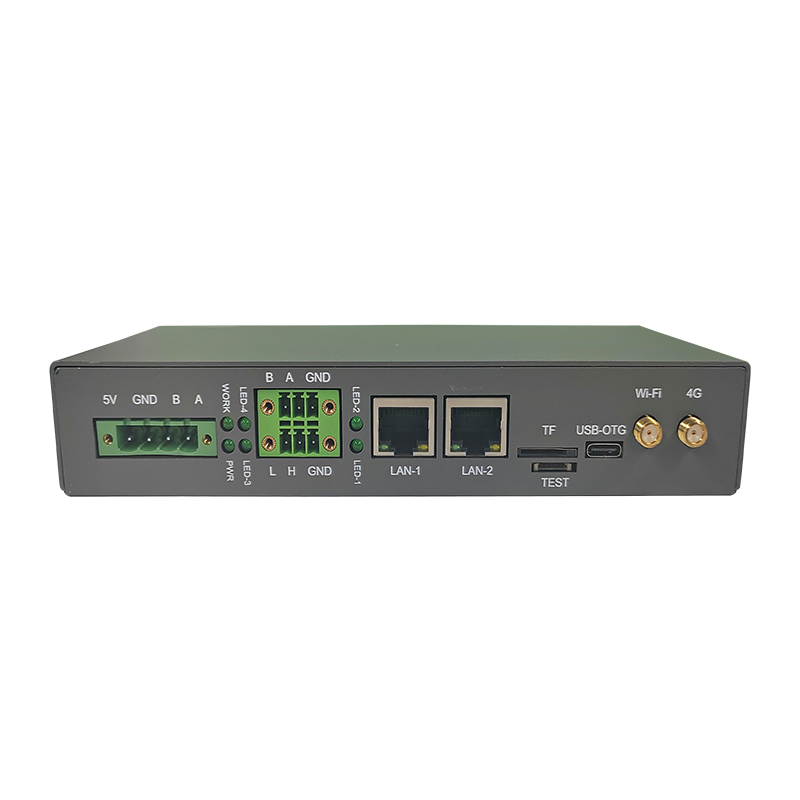
The TV-IS013 uses an STM32MP135 Cortex-A7 processor at up to 1 GHz with 4 Gb DDR3 and 8 GB eMMC. It has two Gigabit Ethernet ports, two RS-485 ports, one CAN port, 4G and Wi-Fi, and publishes over Modbus, MQTT, OPC UA and HTTP with data encryption and remote configuration, so the same unit can work as a Modbus to MQTT gateway or an OPC UA gateway. It runs from 5 V DC at −20 to +70 °C. The TV-W-GYWG is a Cortex-M4 acquisition gateway with two 4–20 mA inputs, two frequency inputs, two CAN buses with J1939, two RS-485 ports, LoRa 915 MHz, NB-IoT, 4G and Ethernet. It accepts 18–36 V DC and operates from −25 to +85 °C. For local visualisation, pair either with HMaker SCADA. Browse the full industrial IoT gateway range or ask about custom firmware through our OEM/ODM service.
About TouchVision. TouchVision has designed and manufactured industrial touch displays, embedded boards, panel PCs, IoT gateways and edge AI computers since 2012, from standard models to full OEM/ODM projects. Standard products carry a 3-year warranty from delivery. For bespoke builds, see our custom industrial IoT gateway design on the TouchVision OEM/ODM site, or read about us.
Frequently asked questions
What is the difference between an industrial gateway and a router?
A router moves IP packets between networks. An industrial IoT gateway also speaks field protocols such as Modbus RTU or CAN, reads device data, processes it and publishes it in IT formats such as MQTT or OPC UA. Some products combine both roles.
Can an industrial IoT gateway convert Modbus to MQTT?
Yes, it is one of the most common uses. The gateway polls Modbus registers and publishes the values as MQTT messages. The TouchVision TV-IS013 supports this over RS-485 or Ethernet.
Should I choose MQTT or OPC UA?
MQTT is lightweight and suits cloud platforms and event-driven dashboards. OPC UA provides rich information models and is common in MES and SCADA. Many gateways support both, so let the receiving system decide.
Do I need a 4G industrial gateway?
Choose 4G when the site has no reliable wired network or when equipment is installed at customer sites where you cannot use their IT network. Check coverage and data costs first.
How do I secure an IIoT gateway?
Use encrypted connections, remove default passwords, prefer outbound-only connections, keep firmware updated and separate the field network from the uplink. Align the design with the ISA/IEC 62443 series.
Sources and standards referenced
- Modbus Organization
- MQTT.org
- OPC Foundation: OPC UA
- ISA/IEC 62443 series of standards
- CISA: Industrial Control Systems
Need a recommendation for your project?
Send your drawings, quantities and environment through our RFQ form and a TouchVision engineer will reply with a recommended configuration, quotation and sample plan. You can also call or WhatsApp +86 135 0532 6001.