A fanless panel PC cools its processor through the enclosure instead of a fan, so dust has no airflow to ride in on and there is no wearing part to fail. The price is a thermal ceiling: power-hungry CPUs, hot cabinets and blocked surfaces can force throttling. Match CPU power, ambient temperature and mounting before you buy.
This guide is written by the engineering team of Beijing Huamei Xuntong Technology Co., Ltd. (TouchVision), a manufacturer founded in 2012 that designs and builds industrial displays, embedded boards, HMI panels, industrial gateways and edge AI computers.
Key takeaways
- A fanless panel PC moves heat through a heat sink or the case, so the enclosure can be sealed against dust, oil mist and moisture.
- Removing the fan removes a wearing part whose failure can overheat the computer, which reduces maintenance and unplanned downtime.
- The trade-off is a thermal ceiling: low-power processors, sometimes larger housings, and possible throttling near the upper temperature rating.
- Specify the measured cabinet temperature, the sustained workload, clearance and sealing, and ask for a soak test with the real application.
- Keep heavy AI or video work on a separate cooled computer and let the panel PC remain a cool-running operator front end.
What is a fanless panel PC and how does it shed heat?
A fanless panel PC is a display, touch screen and computer in one housing that moves heat from the processor into a metal heat sink or the case itself, and from there into the surrounding air by conduction, natural convection and radiation. Engineers call this passive cooling. Nothing spins, so nothing pulls outside air through the electronics.
In a fan-cooled machine, the airflow does two jobs: it carries heat out and, unavoidably, it carries dust, oil mist and moisture in. Remove the fan and the enclosure can be closed. The processor and other hot parts are then coupled to the housing through thermal pads or a copper or aluminium spreader, and the outer surface, often finned, becomes the radiator. That is why fanless designs tend to look heavier and more ribbed than a desktop computer of similar performance.
Some designs go further. Beckhoff describes a fanless industrial PC series built for mounting in the wall of a control cabinet, where the heat sink passes through a cut-out so the waste heat of processor and chipset goes straight to the outside air, while integrated seals keep the front at IP65. Pushing the heat outside the cabinet is one of the most effective tricks available to a fanless design.
What are the real advantages of a fanless panel PC?
The main gains are fewer failures from dust and vibration, less maintenance, silent operation and a sealed front, which together reduce unplanned downtime over the life of a machine. They matter most where a cleaning schedule is unrealistic.
- No wear part. A fan is a motor with bearings. OnLogic points out that dust build-up makes a fan work harder until it slows or stops, after which the computer can overheat and shut down. A passive design removes that failure path, which is why suppliers list longer mean time between failures (MTBF) as a benefit.
- Dust and contamination. Portwell Japan notes that in metalworking and food plants fine airborne particles settle on boards and can cause shorts. A closed housing without vents keeps them out.
- Vibration. Presses and conveyors shake everything near them. Removing the rotating part removes the component most likely to loosen or wear.
- Maintenance hours. No filters to clean and no fans to replace means fewer site visits, which matters for equipment installed in kiosks, substations or machines sold abroad.
- Silence. Useful in control rooms, healthcare, offices and public areas where a whining fan is noticed.
What does a fanless panel PC give up?
A fanless panel PC accepts a lower heat budget: processors are usually low-power parts, the housing may be larger or heavier, and performance can drop when the ambient temperature approaches the upper rating. These limits are physical, so plan for them rather than hope.
Portwell Japan describes the trade-off plainly. Because natural cooling can only remove so much heat, fanless machines mostly use power-efficient CPUs, which caps processing performance; very heavy jobs such as advanced image analytics or large real-time data processing may need another approach. A bigger heat sink also tends to make the case larger and heavier than a fan-cooled unit of similar specification. And when the room nears the upper limit of the operating range, the processor can reduce its clock speed to protect itself, known as thermal throttling, so a non-air-conditioned area in summer may not deliver the performance seen on the bench.
| Factor | Fanless design | Fan-cooled design |
|---|---|---|
| Cooling path | Conduction to heat sink or case, natural convection | Forced airflow through the enclosure |
| Dust and oil mist | Can be sealed; no air drawn through electronics | Filters needed; contamination drawn inside over time |
| Wear parts | None in the cooling system | Fan bearings wear; fan failure can cause overheating |
| Processor power | Usually low-power ARM or low-TDP x86 | Higher-power CPUs and GPUs possible |
| Behaviour near upper temperature limit | May throttle; depends on surface area and clearance | More headroom while the fan works |
| Size and weight | Larger heat sink can add bulk | Can be more compact for the same performance |
| Noise | Silent | Audible fan noise |
For a broader look at when an all-in-one computer is the right form factor at all, see our comparison of an HMI panel vs industrial panel PC.
Which applications suit a fanless design best?
Fanless designs fit machines that run a fixed operator interface for years in dusty, damp, vibrating or quiet places, and they fit poorly where the job needs a high-power processor or GPU. Most HMI work falls in the first group.
An operator screen that shows status, alarms and trends, takes touch input and talks to a PLC or meters over RS-485 or Ethernet rarely needs more than a modern ARM board. Examples include fire-safety and emergency-lighting controllers, power distribution panels, charging and storage equipment, building control points and self-service terminals. Heavy video analytics or large AI models are a different story: they usually belong on a separate edge AI computer with its own cooling, while the panel PC stays a cool-running front end.
How should you specify a fanless panel PC?
Specify the heat path as carefully as the screen: the real ambient temperature at the mounting point, the processor’s sustained load, the clearance around the housing, the sealing needed and the power supply. Then ask for test evidence rather than a datasheet line.
- Measure the ambient: log the hottest and coldest temperature inside the cabinet or kiosk, not the room, including direct sun on the enclosure.
- Size the processor to the workload: choose the lowest-power platform that runs the application smoothly; extra performance becomes extra heat.
- Ask for a soak test: run the real application at the upper operating temperature for several hours and record CPU clock and surface temperatures.
- Keep surfaces free: follow the maker’s clearance; a fanless unit pressed against other hot equipment loses much of its cooling.
- Define the sealing: state the IP rating needed at the front and whether the rear is inside a protected cabinet. Our IP65 vs IP66 vs IP67 guide explains what an “IP65 front” covers.
- Check power and I/O: 24V DC input, serial ports and isolation suited to the cabinet.
- Plan the display: brightness and touch type for the site; brighter backlights add heat, so include them in the thermal budget.
- Confirm supply life: the processor and display should be available for the production run of the machine.
Which passive-cooled panel PCs and boards does TouchVision make?
TouchVision’s panel PC range is built fanless in all-metal housings around low-power embedded boards, from an 8-inch wall-mount terminal to 17-inch capacitive and slim embedded models. Boards, interfaces and firmware are configured per project.
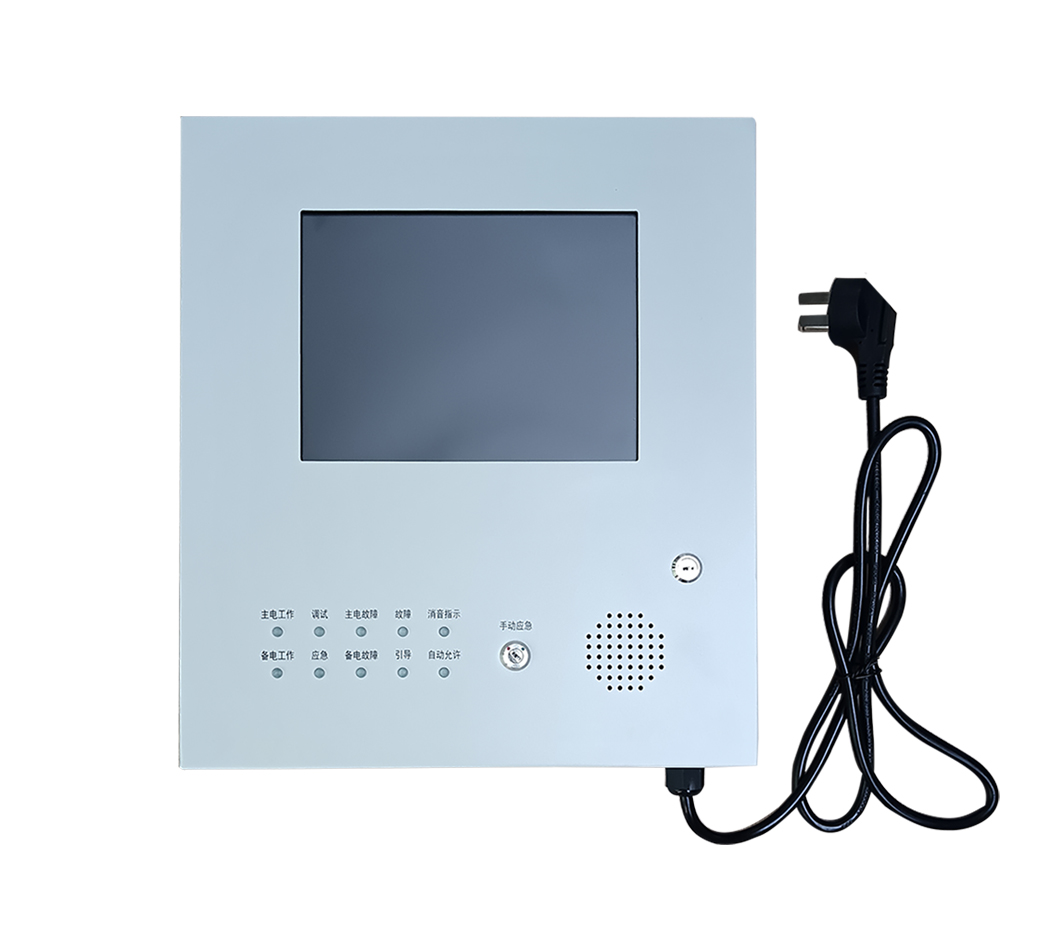
The TV-IN08TP-BG is an 8-inch, 800×600 wall-mount fanless touch panel PC with infrared touch behind 2 mm tempered glass in an all-metal case; it is used as an emergency-lighting controller display and as an HMI in power distribution and fire-safety systems. The TV-IN17TP-BG-PLUS pairs a 17-inch 1280×1024, 250 cd/m² display with capacitive multi-touch in a modular fanless housing for desktop, panel, rack or wall mounting. Where cabinet depth is tight, the TV-IN17P-MINI is an ultra-thin fanless 17-inch unit with 24V DC input, two RS-485 ports, Ethernet and USB.
Inside many of these designs is a low-power board such as the TV-AM3354, a fanless TI Sitara Cortex-A8 board rated for −20 to +85 °C with five RS-485 ports, a hardware watchdog and RTC. For a comparison of processor options, read our embedded board comparison, or browse all industrial panel PCs and HMI panels.
About TouchVision. TouchVision has designed and manufactured industrial touch displays, embedded boards, panel PCs, IoT gateways and edge AI computers since 2012, from standard models to full OEM/ODM projects. Standard products carry a 3-year warranty from delivery. For bespoke builds, see our custom fanless panel PC builds on the TouchVision OEM/ODM site, or read about us.
Frequently asked questions
Is a fanless panel PC more reliable than one with a fan?
In dusty or vibrating places it usually is, because there is no fan to clog or wear out and the housing can be sealed. Reliability still depends on running the processor within its thermal limits.
Do fanless industrial PCs overheat?
They are designed not to, but if the ambient temperature nears the upper rating or the housing is blocked, the processor can slow down to protect itself. Check the operating range and clearance against the real site.
Can a passive-cooled panel PC run AI workloads?
Light inference on a low-power processor with a small NPU is possible, but heavy multi-camera analytics or large models are better placed on a dedicated, actively cooled edge AI computer.
What IP rating does a fanless unit have?
It depends on the design. Many are sealed at the front, for example IP65, while the rear sits inside a cabinet. Always confirm the rating for each face of the unit.
Which TouchVision models are fanless?
The TV-IN08TP-BG, TV-IN17TP-BG-PLUS and TV-IN17P-MINI panel PCs are fanless all-metal designs, and the TV-AM3354 board is a fanless low-power platform.
Sources and standards referenced
- OnLogic: The advantages of a fanless industrial computer
- Beckhoff: Fanless industrial PCs (German)
- Portwell Japan: Choosing a fanless PC for the factory (Japanese)
Need a recommendation for your project?
Send your drawings, quantities and environment through our RFQ form and a TouchVision engineer will reply with a recommended configuration, quotation and sample plan. You can also call or WhatsApp +86 135 0532 6001.