Self-service kiosk hardware has three layers: the kiosk head (touch display and controller board), the transaction peripherals (receipt printer, QR scanner, card or ID reader and a certified payment terminal) and the infrastructure (enclosure, power, network and service access). Specify the use case first, then each part’s interface, approval and serviceability.
This guide is written by the engineering team of Beijing Huamei Xuntong Technology Co., Ltd. (TouchVision), a manufacturer founded in 2012 that designs and builds industrial displays, embedded boards, HMI panels, industrial gateways and edge AI computers.
Key takeaways
- Self-service kiosk hardware splits into the kiosk head, the transaction peripherals, the payment terminal and the infrastructure.
- Choose PCAP touch for indoor kiosks and infrared touch with thick glass for outdoor or high-abuse sites.
- The controller board must have enough USB and serial ports for every peripheral and a maintainable OS.
- Buy an approved payment terminal and mount it, instead of building card reading into the kiosk.
- Plan service access, power peaks and accessibility rules before freezing the enclosure.
What hardware is inside a self-service kiosk?
Inside almost every self-service kiosk you will find a touch display, a computer or controller board, a set of peripherals for the transaction, a power supply, a network link and a lockable enclosure that holds it all. The peripheral mix in self-service kiosk hardware is what separates an ordering kiosk from a hotel check-in terminal, a ticket machine or a government service point.
This is one of the most common questions buyers ask on Quora, and the honest answer is that kiosk components are modular. European makers, from German self-checkout builders to modular stand systems, sell the same cabinet with different readers and printers fitted. Brazilian smart-kiosk vendors follow the same pattern for retail and fuel-station self-service. The work is choosing the right part for each slot and making sure they all talk to one controller.
| Layer | Kiosk components | Main decisions |
|---|---|---|
| Kiosk head | Touch display, cover glass, controller board or PC, operating system | Size and orientation, touch type, brightness, Android, Linux or Windows |
| Transaction peripherals | Thermal receipt printer, QR code scanner, NFC reader, card reader, ID document reader, PIN pad, camera | Which jobs the kiosk must do; USB or serial interface; driver and SDK support |
| Payment | Certified card terminal or payment module, cash recycler where needed | Acquirer, EMV and contactless approval, PCI PTS status |
| Infrastructure | Kiosk enclosure, power supply, Ethernet, Wi-Fi or 4G, cooling, locks | Indoor or outdoor, mains or DC, service access, mounting |
Which kiosk touch screen should you choose?
Pick projected-capacitive (PCAP) touch for indoor kiosks where users expect smartphone-style gestures and easy cleaning, and infrared touch for outdoor or high-abuse sites where gloves, rain and thick protective glass are normal. The kiosk touch screen is the part users judge the whole machine by, so it deserves the most attention.
- Size and orientation: portrait screens from about 21 to 32 inches dominate ordering kiosks; desktop check-in and parcel terminals use smaller sizes.
- Brightness: indoor units are usually fine at standard brightness; anything near glass frontages or outdoors needs a high-brightness panel. See the sunlight readable display guide.
- Glass: toughened glass, with anti-glare or privacy treatment where needed. Thick glass protects against vandalism but raises parallax, which optical bonding reduces; our optical bonding guide explains the trade-off.
- Format: an open frame touch monitor mounts behind your own front panel, while a monitor with its own bezel is simpler to fit. Compare both in open frame vs panel mount.
TouchVision builds kiosk displays from 10 to 32 inches in portrait or landscape. Its infrared touch screens use IP65 metal frames and 3 to 5 mm vandal-resistant glass; its PCAP monitors have a flat glass front for indoor kiosks; and the 19-inch TV-A19101 infrared touch monitor (1280 × 1024, 250 cd/m², CE, FCC Class B and RoHS) is a standard option. For the detailed choice, read infrared vs capacitive touch screen.
What does the kiosk controller board need to support?
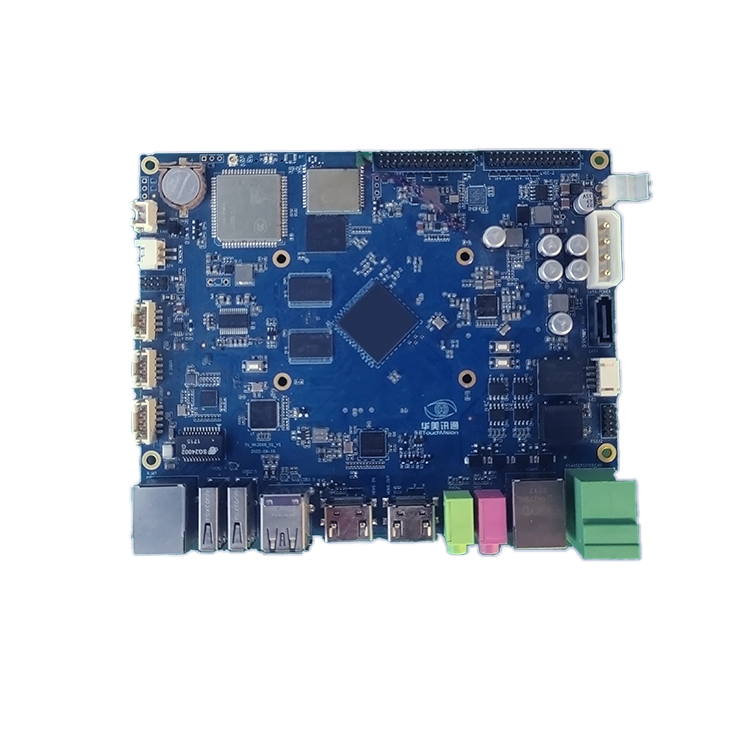
The kiosk controller board must drive the display, run the kiosk application and provide enough USB and serial ports for every peripheral, with an operating system that your software team can maintain for years. Android kiosk designs are popular because they run web or native apps on low-power ARM hardware without a fan; Linux suits custom applications; Windows suits legacy PC software.
- Display outputs: LVDS or eDP for a built-in panel, HDMI for a second customer-facing or advertising screen.
- Peripheral ports: USB for printers, scanners and card readers; RS-232 or RS-485 for payment, dispensing or locker modules.
- Network: Gigabit Ethernet plus Wi-Fi, and 4G where there is no cabled network.
- Lifecycle: a stable OS image, remote update method and a board that stays available.
The TouchVision TV-RK3568 industrial motherboard is a typical example: Android 10, Ubuntu or Debian, dual independent displays, four USB ports, five RS-485 ports, Gigabit Ethernet and Wi-Fi plus Bluetooth, rated -20 to +85 °C. Boards are compared in RK3568 vs i.MX8M vs AM3354.
Which peripherals do different kiosks need?
List the jobs the kiosk must do, such as print, scan, identify or take payment, and add only the peripherals those jobs require, because each extra device adds a driver, a failure point and a service task.
| Kiosk type | Typical peripherals |
|---|---|
| Restaurant or retail ordering | Thermal receipt printer (58 or 80 mm, auto-cutter), QR code scanner, payment terminal with NFC |
| Hotel or clinic check-in | ID document reader, camera for face verification, card dispenser or printer |
| Ticketing and bill payment | Ticket or receipt printer, barcode or QR scanner, card reader, sometimes cash module |
| Bank and government service | ID and IC card readers, PIN pad, passbook reader, document printer |
| Parcel and locker terminals | Barcode scanner for labels, QR scanner, camera, lock control board |
When specifying the thermal receipt printer, ask for paper width, roll diameter, auto-cutter, paper-low and jam sensing, because an empty roll is the most common reason a kiosk stops earning. For scanners, confirm 2D reading from phone screens, not only printed codes. TouchVision self-service terminals can integrate face recognition, PIN pads, ID and IC card readers and passbook readers on the controller board.
How should payment hardware be handled?
Use a payment terminal that is already approved for your acquirer and region, and mount it in a bracket, rather than building card reading into the self-service kiosk hardware yourself. Card terminals handle EMV chip, contactless NFC and PIN entry, and PIN-entry devices must meet the PCI PTS security requirements published by the PCI Security Standards Council.
A bought-in approved terminal keeps certification with the payment provider, so the kiosk controller only exchanges amounts and results over USB, serial or the network. German kiosk vendors, for example, advertise that their cabinets accept “all common payment terminals” through device-specific brackets. Plan the bracket, cable path and service access early; swapping terminals later should not mean a new enclosure.
What enclosure, power and accessibility requirements apply?
The kiosk enclosure must protect the self-service kiosk hardware, give service staff safe access to paper and peripherals, and place controls within reach of all users, including wheelchair users.
- Environment: indoor cabinets need ventilation; outdoor ones need sealing, sun shading and a thermal plan for the brighter backlight.
- Power: one mains inlet feeding a power supply sized for printer peaks, with separate DC rails where boards and peripherals need them.
- Service: lockable doors, front-loading paper where possible and labelled cables.
- Accessibility: in the EU, the European Accessibility Act (Directive 2019/882) covers self-service terminals such as ticketing and check-in machines placed on the market since 28 June 2025; in the US, the ADA Standards set reach ranges for operable parts.
Reach and screen height interact with the screen choice; our accessible locker screen design guide shows how the same rules apply to terminals.
Self-service kiosk hardware checklist
- Use case: the transactions the kiosk must complete, per site.
- Display: size, orientation, PCAP or infrared, brightness, glass, bonding.
- Controller: OS, display outputs, USB and serial port count, network, update method.
- Peripherals: each device’s model, interface, driver or SDK, and consumables.
- Payment: approved terminal model, acquirer, bracket and cable path.
- Enclosure: indoor or outdoor, cooling, locks, service access, mounting.
- Compliance: electrical safety and EMC, accessibility rules for your market.
- Pilot: a small batch of complete units tested together before volume.
TouchVision can deliver a complete kiosk head, meaning the display, touch and board tested as one unit, and supports small-batch first orders. See the self-service kiosk solutions page or browse the industrial touch monitor range.
About TouchVision. TouchVision has designed and manufactured industrial touch displays, embedded boards, panel PCs, IoT gateways and edge AI computers since 2012, from standard models to full OEM/ODM projects. Standard products carry a 3-year warranty from delivery. For bespoke builds, see our custom kiosk touch display builds on the TouchVision OEM/ODM site, or read about us.
Frequently asked questions
What are the main components of a self-service kiosk?
A touch display, a controller board or PC, peripherals such as a receipt printer, QR scanner and card reader, a payment terminal, a power supply, a network link and a lockable enclosure.
Which touch screen is best for a kiosk?
PCAP touch suits indoor kiosks because it is flat, multi-touch and easy to clean; infrared touch suits outdoor or high-abuse kiosks because it works with gloves, rain and thick vandal-resistant glass.
Can an Android kiosk run printers and card readers?
Yes, if the board has the right USB and serial ports and the peripheral makers provide Android drivers or SDKs. Confirm support for every device before choosing the platform.
Do kiosks need PCI-certified hardware?
Payment terminals that accept PIN entry must meet PCI PTS requirements. Using an already approved terminal from your payment provider is the simplest way to meet them.
Can I order a small first batch of self-service kiosk hardware?
Yes. TouchVision supports small-batch pilot orders of displays, boards or complete kiosk heads so you can validate the design before volume production.
Sources and standards referenced
- PCI Security Standards Council: PIN Transaction Security (PTS)
- EUR-Lex: Directive (EU) 2019/882, European Accessibility Act
- U.S. Access Board: ADA Accessibility Standards
- Werkstation (Germany, German): modular self-service kiosk terminal
- Gertec (Brazil, Portuguese): Smart Kiosk SK210
Need a recommendation for your project?
Send your drawings, quantities and environment through our RFQ form and a TouchVision engineer will reply with a recommended configuration, quotation and sample plan. You can also call or WhatsApp +86 135 0532 6001.